


VisualDx
3.977.00 Reviews
App Specs
- Version
- 7.40.1.2
- Updated On
- License
- Free
- Downloads
- 100,000+
- Developer
- VisualDx
- Categories
- Medical
- Platform
- Android
Screenshots
 Analysis by AppCompare
When it comes to diagnosing mysterious rashes or puzzling symptoms, VisualDx is like having a dermatologist in your pocket. Ever found yourself scrolling through the internet trying to match your symptoms with online images? Yeah, me too. That's why I decided to give VisualDx a whirl, and spoiler alert: it's pretty impressive.
Who benefits most from a visual reference?
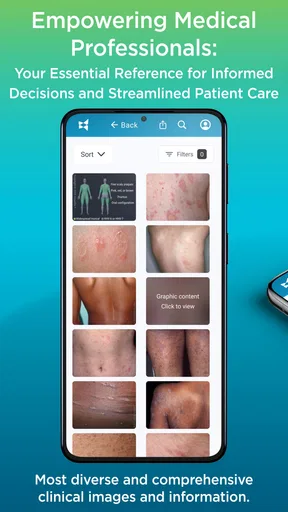
I see the strongest fit for clinicians, medical students, and other health workers who need a visual aid alongside their own examination and training. A searchable collection of clinical images can make it easier to compare what is in front of you with examples, then think through possible explanations. That is a different job from asking a search engine to find pictures: the point is to bring images and diagnostic context together rather than rely on a loose collection of webpages.
For patients, I would use it more cautiously. It can help me learn the words used for a skin concern or prepare a clearer description before an appointment, but a visual resemblance is not a diagnosis. Lighting, camera quality, skin tone, symptom history, and the way a condition changes over time can all affect what an image seems to show. I would not use a match to decide that a worrying symptom is harmless or to delay care.
There is also a practical distinction between learning about a condition and making a treatment decision. Medical explanations can help a reader understand what a clinician may consider, but treatment depends on the person and the full clinical picture. I would treat the app as a reference to support a conversation, not as permission to self-prescribe.
First Impressions
Upon opening the app, the first thing you'll notice is the clean, user-friendly interface. It's not overloaded with unnecessary frills, making it super easy to navigate. Whether you’re a medical professional or just a curious soul like me, VisualDx makes it simple to dive right in. The app's design focuses on function, which is exactly what you want when you’re trying to figure out if that strange rash is just from stress or something more serious.
Features that Stand Out
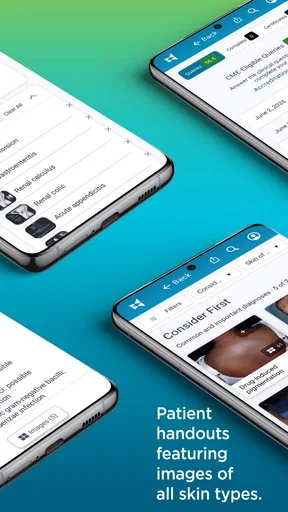
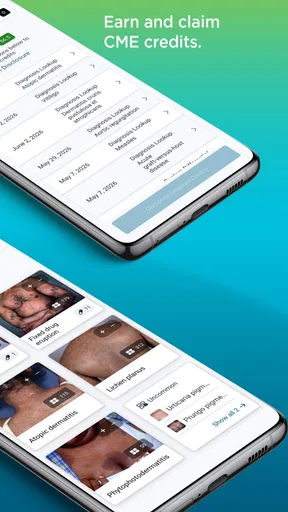
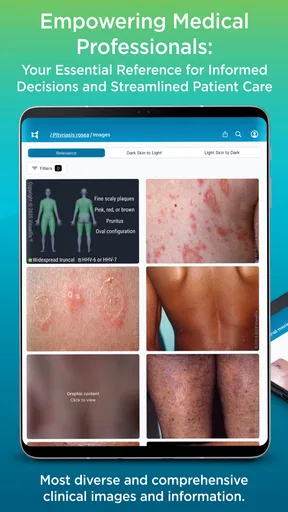
Alright, so what makes VisualDx stand out in a sea of medical apps? For starters, the image database is massive. We're talking thousands of images of various skin conditions, each carefully categorized. This is especially handy when you’re trying to match visual symptoms. Just pop in your symptoms, and bam, a list of possible conditions appears, each with a plethora of images to peruse.
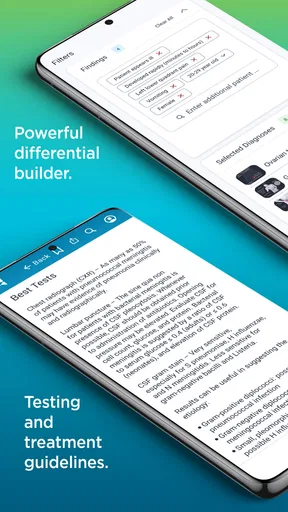
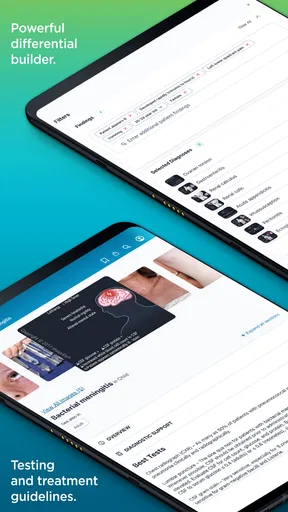
Another feature I found particularly useful is the ability to add specific patient details, like age, gender, and skin type. This allows the app to tailor its suggestions, making it more accurate. It’s like the app is saying, "Hey, I get you, let’s figure this out together."
Worth Reading Before You Choose

EA SPORTS FC Mobile 26 Is a Bigger Football Game, but It Takes Time

Flipboard Shows What News Apps Must Do Beyond the Feed

Switching to Android Auto Means Rethinking Your Driving Routine

Google Calendar Makes a Crowded Week Easier to Manage

Ludo King Makes the Most of the Minutes Between Plans

Baby Panda World Brings Quick Play to Modern Phones, but Its Game Library Feels Busy
How I would use it in a real consultation
In a busy clinic, I would treat the image search as a second look, not a shortcut. I’d first note the patient’s timeline, symptoms, relevant background, and what I can observe in person. Then I’d enter only the details that genuinely help narrow the search, including the patient characteristics the app supports. This order matters: starting with a visual hunch can make it tempting to fit later details to the first image that looks familiar.
A useful habit is to compare several plausible results rather than stop at the closest-looking picture. Similar appearances can have different causes, and a difference in distribution, duration, or accompanying symptoms may change how a clinician thinks about them. I would use the images to prompt questions and check my reasoning, then weigh the results against the history and examination. That workflow makes the visual reference more valuable while keeping its limits clear.
Practical Use Cases
Imagine you’re a busy family doctor with a constant stream of patients. VisualDx could be your secret weapon. By inputting symptoms and viewing the image results, you can quickly narrow down potential diagnoses, saving time and increasing accuracy. For someone like me, who just wants to understand what's going on with my skin, it’s a handy tool to have on standby before deciding if I need to see a professional.
Moreover, it’s not just about skin conditions. The app can assist with a range of medical issues, making it versatile and comprehensive. This broad scope is a major plus if you’re dealing with a variety of symptoms and need a second opinion.
A realistic everyday scenario
Say I notice a new patch on my arm before work and have an appointment later that week. Rather than searching the web until every result feels alarming, I could use a medical image reference to learn what kinds of descriptions and comparisons may be relevant. I would note when it appeared, whether it is changing, and any other symptoms, then bring those observations to the clinician. If it looks severe, spreads quickly, or comes with worrying symptoms, I would seek medical help promptly instead of waiting for an app search to settle the question.
That is the sort of everyday use I find sensible: preparation, vocabulary, and a better-organized conversation. It is not a reliable way to rule out urgent problems from a phone screen. A clear photo and a similar-looking example may be useful discussion points, but they cannot reproduce an examination or account for everything a clinician needs to know.
What makes it different from general searches?
The usual alternative for a consumer is a web search or a general health-information site. Those can be useful for broad reading, but image results may be mixed in quality and context, and it can be hard to tell whether a picture is comparable to the concern you have. VisualDx is more focused on medical imagery and differential thinking, which is why I see it as more useful for structured comparison than casual browsing.
That focus does not automatically make it the right choice for everyone. A clinician may already have trusted references built into a workplace workflow, while a patient who mainly wants appointment booking, medication reminders, or a direct consultation needs a different kind of app. For a straightforward question about common self-care, a reputable patient education resource may also be easier to interpret. VisualDx is most compelling when the visual reference itself is the need.
Learning and Expanding Knowledge
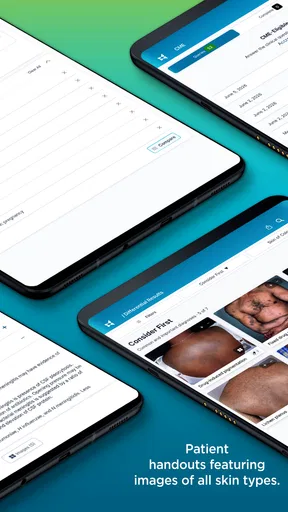
Beyond its diagnostic prowess, VisualDx is a treasure trove of information. If you’re a med student or just someone who loves learning (guilty!), you’ll appreciate the detailed explanations and treatment recommendations. It’s like having a mini medical library at your fingertips, without the bulk.
For students, I would make the comparison process part of studying rather than simply memorizing image-to-condition pairs. Before looking at candidate results, write down what features stand out and what details would change the differential. Afterwards, compare the possibilities and ask why two conditions that look alike might call for different questions or next steps. That turns image browsing into active practice and reduces the risk of treating a single photograph as a complete lesson.
For clinicians, a further trade-off is speed versus completeness. A quick search can be useful between tasks, but a fast result is only as good as the details entered and the time spent checking it. If a case is complex, unusual, or not improving as expected, I would not let a convenient reference replace consultation with a colleague or a more thorough work-up. The app can help organize possibilities; professional judgment still has to decide what matters.
What the current version means for existing users
VisualDx is a medical app from VisualDx, and its current version is 7.40.1.2. It has been available since February 1, 2011, so it is an established product rather than a new experiment. That history may reassure users who want a long-running reference, but age alone does not prove that every detail is right for every case. I would still check the content relevant to a particular clinical question and use sound professional judgment.
The app is free to download, has an Everyone content rating, and has a 3.9 average from 457 ratings, alongside 77 written reviews and over 100,000 installs. In-app purchases range from $39.99 to $299.99 per item, so I would check what access is included before relying on it for regular work or study. The free entry point makes it possible to assess the basic experience, but the purchase range is substantial enough that occasional users should think carefully about whether their expected use justifies paying.
For someone already using it, I would focus on practical continuity rather than assume that a version number means a particular new tool or redesign. The release information confirms the current version, but it does not by itself tell me which workflow changed. If the app is part of a clinical routine, I would verify that the functions I depend on still suit that routine after an update, especially before using it in a time-sensitive setting.
Friction, access, and sensible expectations
The purchase structure is the clearest decision point for many users. A casual reader may open the app only when a skin concern appears, while a clinician or student may need repeated access. Those are different value calculations. I would explore what is available without payment first, then compare any paid option with the amount of use I realistically expect, rather than assume that every useful reference is included at no cost.
Device compatibility is another practical check: the listed minimum operating system is 8.0. Before planning to depend on the app, I would make sure the device can run it and that I can reach the material I need in the places where I expect to use it. For a student, that might mean checking access before a study session; for a clinician, it means avoiding the awkward discovery that a tool is unavailable when a patient is waiting.
I would also be careful about the word “accurate.” Tailoring results with patient details is helpful, but it does not guarantee a correct conclusion. The quality of the input, the limits of images, and the user’s experience all matter. If the app surfaces a possibility that conflicts with the person’s overall condition, I would not privilege the screen over the patient in front of me.
Where I would draw the line
I would skip VisualDx if I wanted a definitive answer from a symptom checker, a substitute for an appointment, or a way to choose treatment without professional input. I would also look elsewhere if my main need were general wellness tracking or a direct connection to a clinician. This app’s value is concentrated in medical reference and visual comparison; it is not a complete care service.
For someone with a new or worsening concern, the best next step may be a healthcare professional rather than another round of image matching. The same applies when symptoms feel urgent or are accompanied by significant illness. I like having a reference that can help me ask more informed questions, but I would never let a reassuring-looking image overrule a concerning change in how I feel.
What I would watch over time
As VisualDx continues to evolve, I would pay attention to whether its image reference and clinical explanations remain useful in day-to-day practice, and whether updates make common tasks clearer for both experienced users and newcomers. Those are things worth judging through actual use, not assumptions based on a version number. I would also watch how the available purchase options fit different users, since a one-off learner and a frequent professional have very different needs.
For existing users, a good personal check is to revisit the app’s role every so often: does it still help answer the questions you bring to it, and do you know when to step away from it? That is more meaningful than expecting every release to change the whole experience. A clinical reference earns its place by supporting careful thought, not by replacing it.
Final Thoughts
In a world where we often turn to Google for medical advice, having a reliable resource like VisualDx is a game-changer. Whether you’re a professional in the field or a layperson trying to make sense of a pesky rash, this app is worth having on your phone.
Of course, while VisualDx is fantastic, it’s no substitute for professional medical advice. Always consult a healthcare provider for a definitive diagnosis. But as a supportive tool, it’s top-notch. It’s like having a trusted advisor who’s always ready to help you out, day or night.
So, if you’re looking for an app that combines visual diagnostics with an expansive medical library, give VisualDx a try. It’s intuitive, informative, and just might save you a trip to the doctor’s office. And who doesn’t love a little peace of mind?
Pros
- Comprehensive medical database.
- User-friendly interface design.
- Regular updates with new data.
- Offline access available.
- Supports clinical decision-making.
Cons
- Requires a subscription for full access.
- Heavy app size for some devices.
- Limited language options.
- Occasional slow loading times.
- No direct patient interaction features.
FAQs for VisualDx
What is VisualDx and how does it work?
VisualDx is a clinical decision support tool used by healthcare professionals to assist in diagnosing various medical conditions. The app provides high-quality images and information about diseases, helping users identify symptoms and potential diagnoses quickly. It's designed to enhance clinical accuracy by offering a vast database of visual and textual resources.
Is VisualDx suitable for non-professionals or medical students?
While VisualDx is primarily designed for healthcare professionals, medical students and knowledgeable non-professionals can also benefit from its comprehensive database. It helps users learn about a wide range of medical conditions through its extensive collection of images and diagnostic information. However, it is recommended to use it under supervision if you are not a professional.
What platforms are supported by VisualDx?
VisualDx is available for both Android and iOS devices, ensuring compatibility with a wide range of smartphones and tablets. The app can be downloaded from the Google Play Store for Android users and the Apple App Store for iOS users. It requires a stable internet connection for optimal functionality and access to its extensive database.
Does VisualDx require a subscription or is it free to use?
VisualDx typically requires a subscription for full access to its features. There may be different pricing plans available depending on the user’s needs, such as individual or institutional subscriptions. While some basic features might be accessible for free, a subscription unlocks the complete range of diagnostic tools and resources.
How reliable is the information provided by VisualDx?
VisualDx is highly reliable, as it is developed by a team of healthcare professionals and used by clinicians worldwide. The app is regularly updated with the latest medical information and guidelines, ensuring users have access to accurate and up-to-date resources. It is a trusted tool in the medical community for aiding accurate diagnosis.


